
Sunday, July 21, 2013
Pinterest top 10 for next school year Linky Party
My second linky party and of course it is Pinterest related! I absolutely love Pinterest! Last year, our color printers at school got a serious workout because of Pinterest. I swear it was redo your room year for everyone and I LOVED IT! I am attempting to give our printers a break this year (let's face it, my room is already too cute) and I am concentrating more on technology and curriculum when I am pinning. I can hear a sigh of relief from our color printer right now. Well here are my Top 10 Pinterest Ideas for next year....


Thursday, July 18, 2013
Tune Into Technology Linky - My First Linky!
I am so excited to participate in my very first linky from Learning To The Core and iTeach 1:1 . My first of many I hope. I am a "tech nerd", so this was perfect.


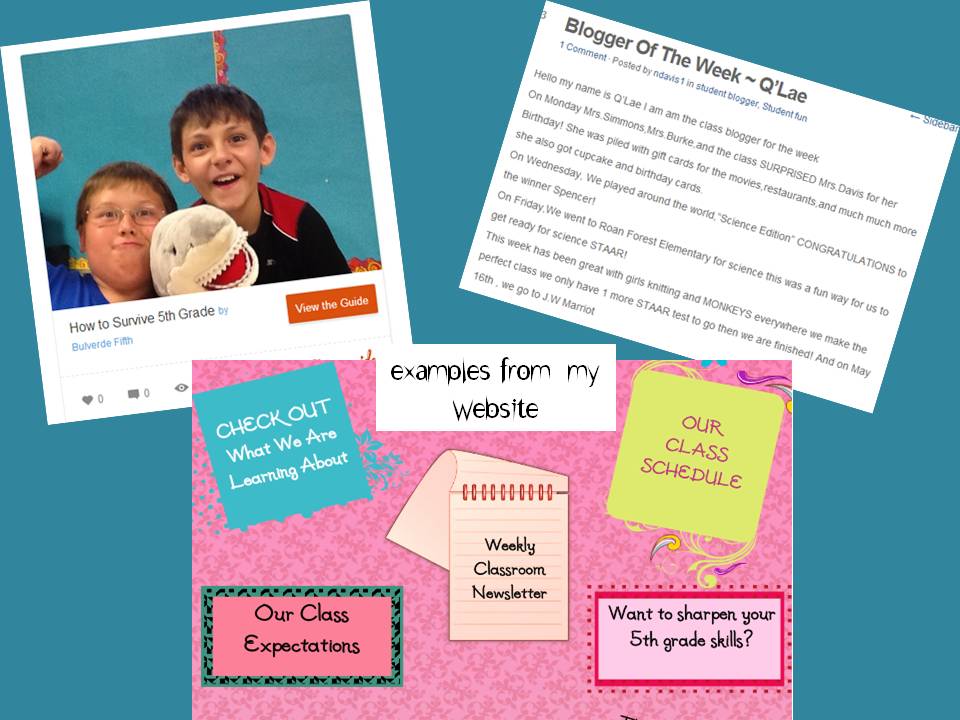
I love my classroom website! I have worked on it for many years. I began with our district assigned website but it was very basic, so this year I converted it to a blog/website as I wanted to make it more interactive. Here is the link to my classroom website.

1 All About You: Future students and parents love
to learn about their new teacher before they meet them.
2. Classroom Information: Your Schedule,
Newsletter, Upcoming Events , Expectations and Helpful Links for Students and Parents
3. Students Creations: One way to get parents involved
and aware of the “happening” in your class room is by posting their child’s
work for them to see. (plus the kids love to see each others work also)
4. Student Interactions: This year, I began a weekly
student blogger. Their job was to write a post about our week and add it to the
blog. They loved it. I plan to add a Guest Tweeter next year!
5. Blogging/Website Etiquette: This is important to have
if you are planning to make your website interactive.
Well, I think that is enough for tonight. Please leave me a comment as I am very nervous to put my first linky out for the world to see!
Wednesday, July 17, 2013
Must Have Free App - Pic Collage
I simply love Pic Collage. It is one of the best apps that I have come across during my iPad adventures. It's uses are endless and the kids catch on so quickly, there is not a lot of time wasted trouble shooting and explaining how to use it.
At the end of the year, we usually do a memory book with our 5th graders. This year, I decided to do save a few trees and go totally digital. We created 6 pages total using pic collage and then imported them into Flip Snack. I was so impressed with their growth and techno skills, I am never going back to paper. Here is one example.
My next Pic Collage adventure did not turn out how I planned, it turned out BETTER!
When we were studying adaptations and animal behaviors, we did an activity where we created unique animals on paper first. My idea originally was to create a collage with their animal and describe how each of their adaptations effected their animal. Their project had to include food, defense,shelter and create a name for it. I had pictured this all in blocks with labels evenly spaced out (that's the organized person in me). Due to lack of time, I did not show them how I wanted it done, but just gave them they basic directions and requirements. WOW, I was amazed with what they created. My initial thought was "OH no, that is not what I was thinking " but they had actually created their own idea and that was really my goal! Have I mentioned how much I love my iPads! Here are a few examples.


My students loved Pic Collage just as much as I did. They even used it during their free time. I love how they were able to express themselves. Go Pic Collage!


At the end of the year, we usually do a memory book with our 5th graders. This year, I decided to do save a few trees and go totally digital. We created 6 pages total using pic collage and then imported them into Flip Snack. I was so impressed with their growth and techno skills, I am never going back to paper. Here is one example.
My next Pic Collage adventure did not turn out how I planned, it turned out BETTER!
When we were studying adaptations and animal behaviors, we did an activity where we created unique animals on paper first. My idea originally was to create a collage with their animal and describe how each of their adaptations effected their animal. Their project had to include food, defense,shelter and create a name for it. I had pictured this all in blocks with labels evenly spaced out (that's the organized person in me). Due to lack of time, I did not show them how I wanted it done, but just gave them they basic directions and requirements. WOW, I was amazed with what they created. My initial thought was "OH no, that is not what I was thinking " but they had actually created their own idea and that was really my goal! Have I mentioned how much I love my iPads! Here are a few examples.


My students loved Pic Collage just as much as I did. They even used it during their free time. I love how they were able to express themselves. Go Pic Collage!


Free Math Software Download From Lakeshore Learning
I love FREE! I have mentioned it before and I think I am starting to see a theme for my new blog. FREE! That is a great Lesson Learned and certainly a Lesson Loved for me. So I was on Lakeshore Learning today and discovered that if you sign up for their emails, you can get a free Math Digital Download Game.

Click on the picture above or here to signup for your free download. Once you fill out the form, they will email you the download. You can't beat that.
Creating How To's Using Snap Guide
I found this brilliant app called SnapGuide at the iTunes store and it's free. I love FREE~ Snap Guide is an excellent step-by-step how to guide creator. It can be used on an iPad by downloading their app or by visiting their website. You can create step-by-step guides for cooking, sewing, diy, fashion and much much more. As I stated in my post last week, I love anything that is easy to use and Snap Guide is just that. It's simple to use: upload a pictures, add a caption, then move to the next page. It also has cool features like ingredients or supplies needed. They can also be shared on Facebook! At the end of the year, my students created step by step guides for future 5th graders. I have these posted on my school blog for future 5th graders to see. Want to see more? Click here
Monday, July 8, 2013
Have You Tried Smore?
I love it when I find a website that is easy to use and will produce a fabulous project. So many times, I will find a site and it will take hours to try to figure out how to use it (I have spent many frustrating hours tinkering and then quitting). That is why when I find a great website like Smore, I have to write about it. Smore is a website where you can create flyers that can be shared, embedded or even printed out. It is absolutely amazing. My class was researching famous inventors and the students used Smore to present our information that they learned during their research. Smore is very user friendly, you can upload pictures, videos, forms and links. I also used it to create a flyer for a summer technology class that I will be teaching this summer. Here are a few of the AMAZING flyers that were created by my students.
Want to see more? Click on the links below:
Eryn & Emily Mariam & Maddie Harrison & Jorden Valerie & Mia
Want to see more? Click on the links below:
Eryn & Emily Mariam & Maddie Harrison & Jorden Valerie & Mia
Sunday, June 30, 2013
My First Blog Post
So here I am ready to begin my journey into blogging! I am excited and nervous at the same time. After many years of blog stalking, I figured it was time to share some of my ideas. My love of teaching and learning has brought me here and I hope I can do a good job in sharing my ideas.
Here is a little about me. My name is Natalie Davis and I teach 5th grade. This is my 17th year teaching. 11 years were in Kindergarten and 6 have been in 5th grade. I am a mother, a wife and a doxie owner! One other thing about me, I LOVE technology. I love to find new ways for my students to use technology in our classroom, so many posts will be about technology. I am so excited to finally begin sharing with everyone after all the years that I have blog stalked so many others.

Subscribe to:
Posts (Atom)